*If you're returning from a break in setting up your tournament's website:
1. Go to your tournament's URL and log in.
2. Click Administration.
3. Click Events Offered.
The next task we need to complete is much more simplistic than the previous step. We just need to name the different sections of events at your tournament. Some tournaments call these Patterns, some call them Sections, and some call them Flights. Whatever you call them, these are usually groups of events lumped together for scheduling purposes. In fact, some tournaments don't even have groupings, so for our purposes we might just divide our tournament into a debate group and an individual events group. It's entirely up to you.
Why have groups (Patterns / Sections / Flights) at all? A "group" of events will be listed together within the website. If you have three "Patterns", then all of the "Pattern A" events will be listed, then the "Pattern B" events, then the "Pattern C" events. Room estimates are caclulated separately for each "Pattern". Other than these two things, the "patterns" don't really impact the website.
Your tournament may not really have any need for patterns at all. The website still will group all of your events together by pattern, so you may just need to enter "Individual Events" or "Debate" as the name of your single pattern. Patterns really apply more for tournaments with lots of events or tournaments with generous cross-entry allowances for students, but even a tournament with only one event still needs a pattern for purposes of the website. If you have patterns, you probably will know exactly what they are; otherwise, just enter something ("Individual Events", "Debate", "Events", etc.) for your pattern name and continue.
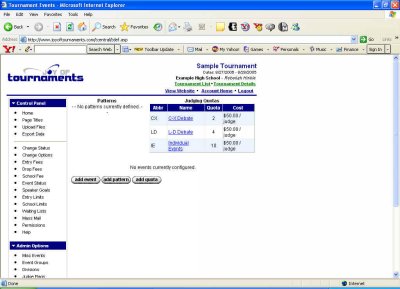
You should presently be looking at a page that looks similar to this one:
Let's begin by clicking Add Pattern. When you do this you'll be taken to a screen with an empty box waiting for you to type.
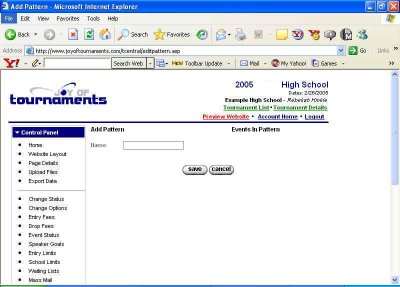
Now we just repeat the process with our second section. Click Add Pattern, type the name in the box (Section B, Flight Two, or Pattern B this time) and click Save. We want to keep doing this until we've entered all the event sections for our tournament. After we've clicked Save for the last time, we'll be back at the page that lists Patterns, Judging Quotas, and Events, and now it will list both your judge quotas and your tournament's patterns.
Now you're ready to Enter the Events offered at your tournament!