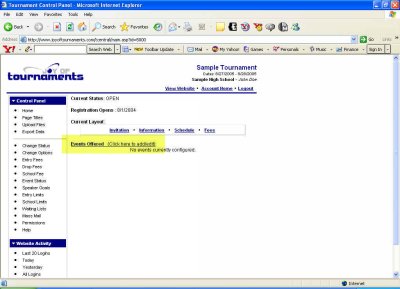
*If you're returning from a break in setting up your tournament's website:
1. Go to your tournament's URL and log in.
2. Click Administration.
You should be looking at a page very similar to the one below, listing the status of your tournament as Private, the anticipated opening date of registration, and the Current Layout. Now click on Events Offered.
We'll start out by setting up judge quotas. This is probably the most variable of all steps to setting up your tournament's website, so take time to read through this step carefully.
Click on Add Quota.
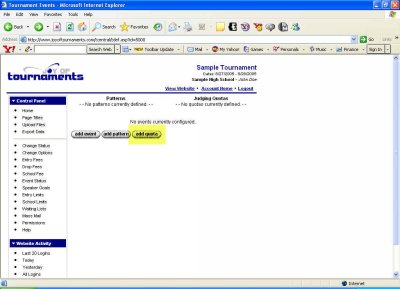
You'll see a series of boxes that we'll want to fill in according to the judge requirements of your tournament.
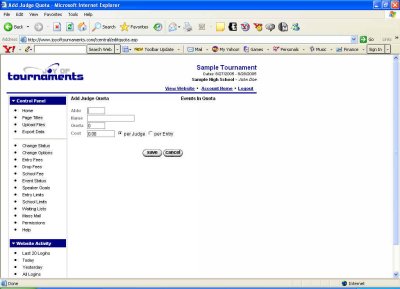
Let's talk in terms of example tournaments first, then you can adapt for your own tournament's needs. For instance, a tournament host might say in the Information document that a school must bring one judge for every two CX teams or else pay a $50 judge's fee. If that is the case, we'd begin by deciding on an abbreviation for this particular judge quota. In the abbreviation box, we'd type CX. Below that, in the Name box, we'd type, C-X Debate. Next, in the Quota box, we'd want to type in the number of entries that require ONE judge. For our example, we'd type 2, because we said one judge for every two teams. Then in the fee box, we'd type 50, because that's what they'll pay if they don't bring a judge. Lastly, we want to choose either per Judge or per Entry. This means that you can choose to charge for missing judges on a flat per-judge rate, or you could charge an amount per each entry that isn't covered by a judge. In our example, we'd choose per Judge, because the teams will be paying a fee for each judge they don't bring.
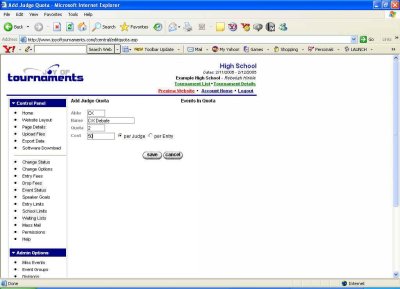
Then we'd click Save. That would take us back to the previous page, where, because we probably have more quotas to enter, we'd click Add Quota again.
Let's look at another example. A tournament host might say to schools that they must bring one judge for every 15 individual event entries they have or else pay $5 for each uncovered entry. In this case we'd first choose an abbreviation. We could type IE, then we'd name the quota Individual Events. After that, in the Quota box we'd type 15, because we said that there would be one judge for every 15 entries. For the fee, we'd type 5, and we'd choose per Entry this time, because we're going to charge for each uncovered entry. This means that a school who brings 16 entries would be able to provide one judge for the first 15 entries, then pay $5 for the one uncovered entry, rather than having to provide two judges or being charged 15 entries-worth of judge fees.
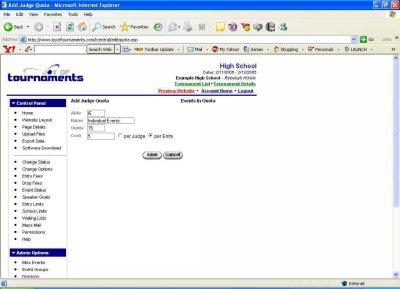
Lastly, we'd click on Save, which would take us back to the previous page again. Each time you return after entering a quota, you'll see all the judge quotas you've entered so far.
Let's continue looking at example tournaments....
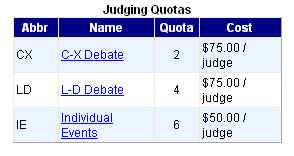
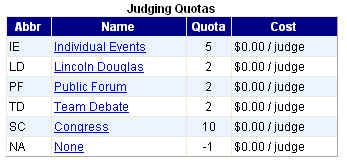
This configuration indicates the following:
*It's important to note here that we've grouped all non-debate events together here under Individual Events. That means that if a school sends 2 Poetry students, 3 Extemp students, and 1 Duet Acting team, the school would need to provide 1 judge to cover all 6 entries. If one judge can cover multiple events, then one quota can relate to multiple events.
*In addition, we aren't differentiating between novice and varsity debate. So if a school brings one novice CX team and one varsity team, they only have to provide one judge to cover the two teams.
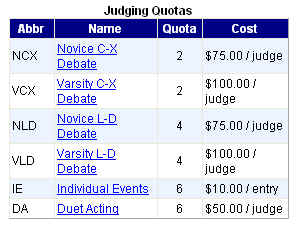
This configuration indicates the following:
*In this example we've separated out novice and varsity, so if a school has one entry in novice LD and one entry in varsity LD, they'll need to provide two different judges.
*Also, this time we've made a separate quota for IE events and duet acting. That means that even if a school sends 2 Poetry students, 3 Extemp students, and 1 Duet Acting team, the school would need to provide one judge for the IE events and one judge for the Duet Acting team.
In essence, EACH QUOTA represents a minimum of ONE REQUIRED JUDGE, as long as the school enters that event.
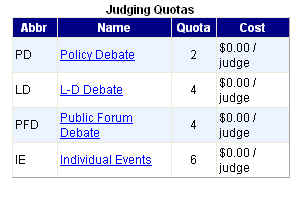
This configuration indicates the following:
*This tournament requires judges but doesn't charge for those not provided.
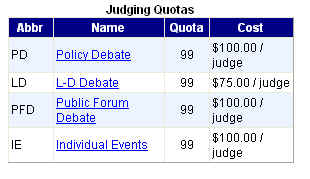
This configuration indicates the following:
There are also tournaments that don't require judges for some or any events. This is how we would enter that:
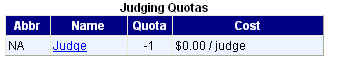
This configuration indicates that for all events assigned the quota of NA there will be no judge required.
Now, if your tournament will not require judges, but you would like to provide a space for names of judges to be entered if schools choose to bring them, then you would enter "0" instead of "-1".
Many schools, whether they have judge requirement or not, charge a flat "judge fee" for each school attending the tournament. If that is the case for your tournament, please notify The Joy of Tournaments and we will include that as a part of your website.
We'll continue below with several more examples and brief explanations.
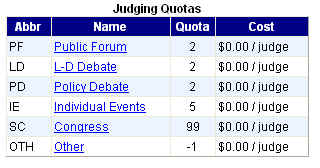
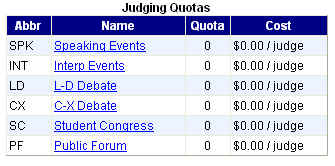
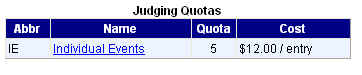
This tournament uses the same quota for all events--1 judge for every 5 entries, or pay $12 for each uncovered entry.
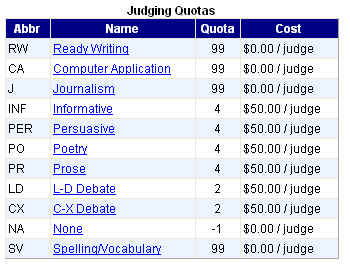
Now that you get the idea, you can follow the steps using the information for your own tournament.
Make sure you click Save each time you've entered a new quota.
When you've entered all the quotas for your tournament and clicked Save for the last time, you should be back at the page that lists Patterns, Judging Quotas, and Events. This time you'll see each of your judge quotas listed, as in the above examples.
The next step in this process is to Set up the Patterns for your tournament.